Enable Vertical Video
In Blackmagic Camera, open Settings → Camera → Enable Vertical Video. Official iOS specs say that when this is disabled, recording stays landscape even while the phone is upright. That explains a plausible UI surprise. [B1]
VERTIMORPH / RESEARCH REPORT / 27 OCTOBER 2026
A working guide to what changes when you turn the camera, turn the optics, or change the de-squeeze—and how to test it on an iPhone 12 Pro.
The setting is the first thing to try. The harder—and more interesting—question is which way the adapter squeezes, and what the app actually writes into your file.
In Blackmagic Camera, open Settings → Camera → Enable Vertical Video. Official iOS specs say that when this is disabled, recording stays landscape even while the phone is upright. That explains a plausible UI surprise. [B1]
Turning the phone changes the frame orientation. Rotating the adapter relative to the phone changes its optical axis. A portrait frame with horizontal expansion and one with vertical expansion are different looks. We show both below.
A correct preview does not establish correct recorded pixels or metadata. Keep an uncorrected reference, apply a known axis correction once, and inspect the result with a circle and upright arrow.
02 / WATCH THE ORIGINALS
These videos are useful demonstrations, not certifications of your phone, mount or app. The complete accessible auto-generated captions were reviewed for both, with visual checks of selected frames. Caption spelling is imperfect; the video titles and creator names below come from the actual watch pages. Original transcripts are not republished.
Blazar distinguishes four camera/lens orientations and calls portrait sensor plus horizontal anamorphic Vertiscope. Later sections compare sensor shapes, monitoring, hardware processing and post-production. Its camera-wide claims are historical demonstrations, not present-day iPhone guarantees.
Moment demonstrates an Anamorphic II with its case/drop-in mount, adjustment key, external monitor and Resolve workflow. The presenter describes a boxier result as vertical anamorphic. The reviewed material does not establish the exact iPhone model or original raster. A shown 1.5 correction is not proof that your nominal 1.55× adapter needs 1.5.
“Vertimorph” remains our working app/project name. We do not force it onto either creator’s terminology. For technical discussion below, every configuration is identified by the upright frame and the optical squeeze axis. That makes the intended operation testable even when naming differs.
03 / THE FOUR CONFIGURATIONS
The following four stills are limited third-party references from Blazar’s configuration demonstration. They retain the video’s matte and on-screen ratio labels. They are not iPhone footage or commercial product photography. Their warm sunset color is source content; the surrounding report remains monochrome.
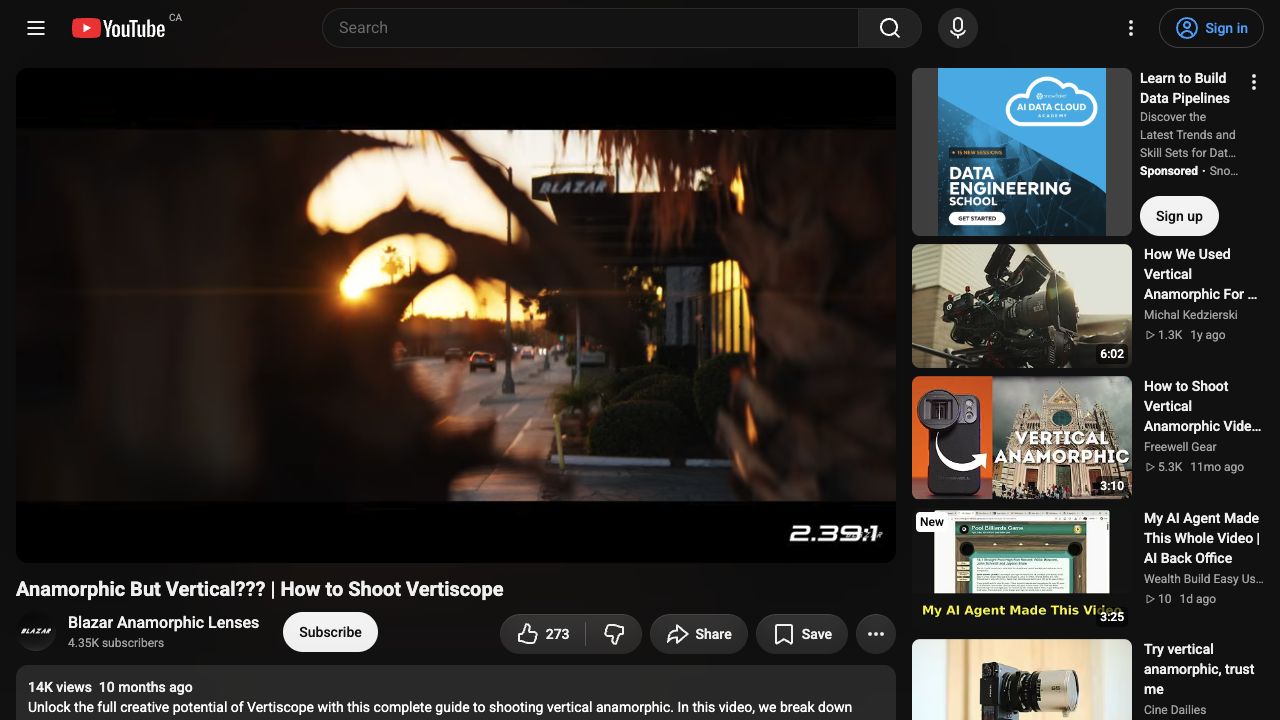
For a planned 16:9, nominal 1.55× iPhone test, the calculated X-corrected ratio is approximately 2.756:1 before any delivery crop. A familiar scope label does not change that arithmetic. Use the actual source shape and measured factor, then deliberately choose a delivery crop.
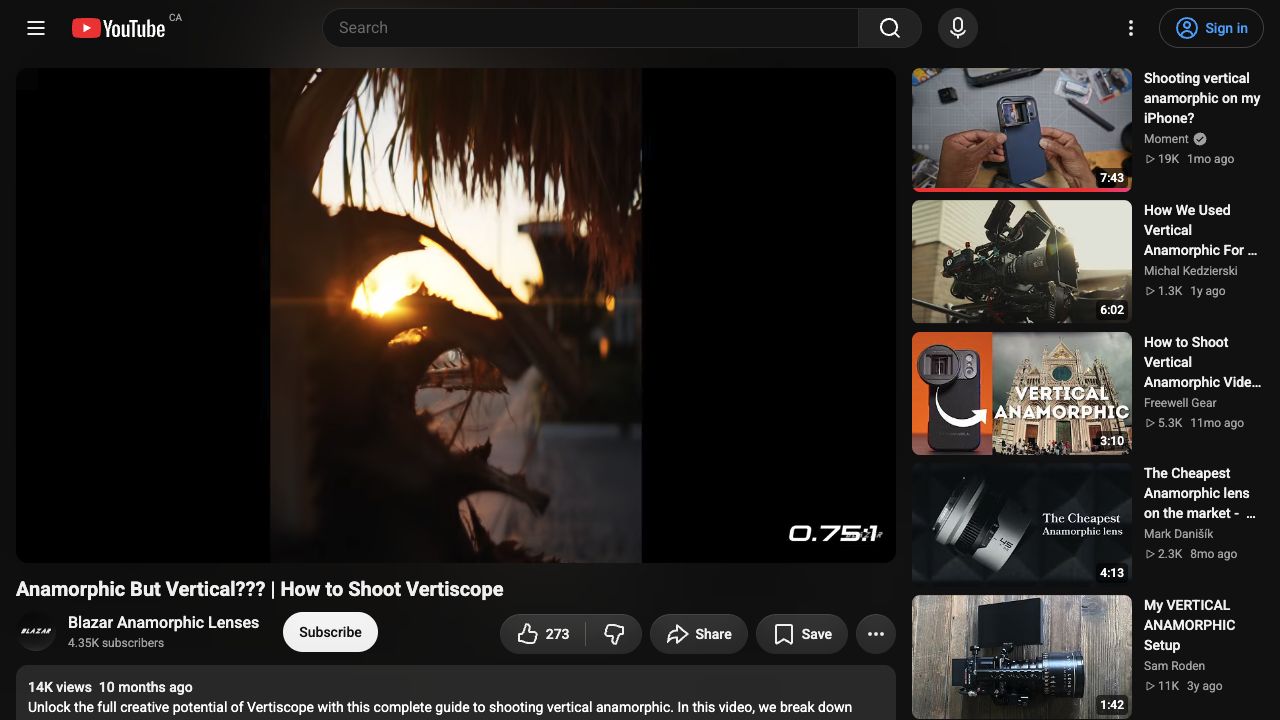
For a 9:16 recording with a 1.55× X squeeze, our expected corrected shape is 0.872:1, rather than the narrower 0.75:1 shown here. It is still a portrait frame, but returning it to 9:16 discards some expanded width. Compare it with a plain 9:16 spherical-phone shot before deciding that the added setup earns its place.
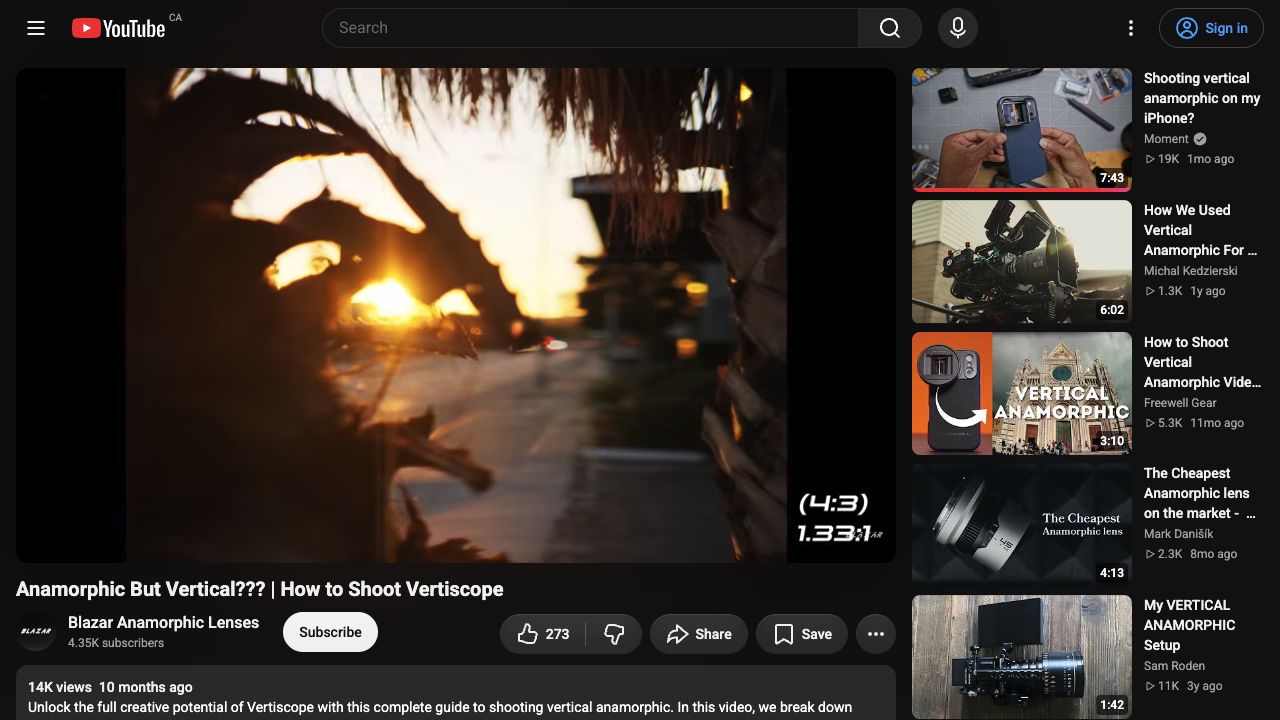
For our 16:9 base at 1.55×, correcting Y gives 1.147:1—a near-square landscape shape. This is one reason “vertical anamorphic” need not mean a tall finished picture. Rotating the optics also rotates their directional character; its strength and appearance on a small mobile adapter must be demonstrated, not borrowed from these shots.
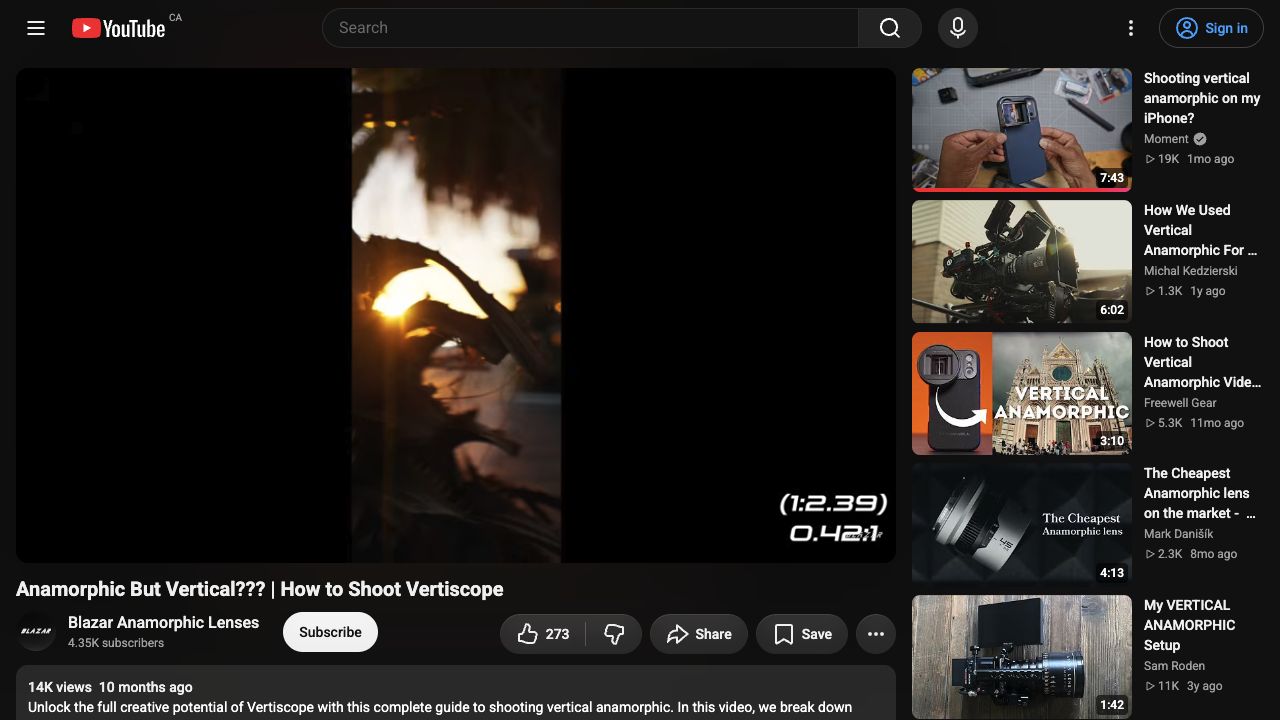
Our 9:16 base at 1.55× becomes 0.363:1, or approximately 1:2.756. This is the very tall experiment described in the first workup. It is distinct from configuration B. Neither is automatically the “correct” portrait workflow; the intended subject, delivery frame and actual optical assembly decide.
Still ownership remains with the respective creator/rightsholders. These browser-captured excerpts are included only for this editorial analysis, with source timestamps. No permission for advertising, store product photos or wider distribution is implied. No frame was synthesized or altered to simulate performance.
Landscape is 16:9. Portrait is 9:16 after orientation is interpreted. A rotated preview, a file transform and physically rotated encoded pixels can all look upright; they are not identical file structures.
We define X and Y in the upright final image. X compresses left–right; Y compresses top–bottom. Turn the adapter 90° independently to swap axes, if the mount permits a secure, centered rotation.
Correct the compressed dimension once. An X-squeezed recording needs X expansion; a Y-squeezed recording needs Y expansion. Wrong-axis correction distorts geometry. Correction on both preview and export can accidentally be applied twice.
Optional: open the aspect and delivery-crop calculator. The report itself does not require interactive controls.
Calculated ideal ratios before stabilization crop, overscan or delivery cropping. X: A × S. Y: A ÷ S. A = upright width/height; S = squeeze factor. Fill crop retains min(A/T, T/A) of corrected area, where T is target width/height. Fit/letterbox preserves the full image. Crop retention is geometry, not a quality score. Optical adapters can deviate from nominal squeeze across focus distance.
The phone and attached lens rotate together. Their relationship to the sensor stays the same; the relationship to an upright delivered image changes with orientation interpretation. Do not label a mode “vertical anamorphic” purely from how the phone is held. Slate a circle, an arrow and the adapter’s axis mark, then inspect the recorded file.
An anamorphic adapter compresses a wider or taller view onto the recorded frame. Expanding it restores proportions; it does not create more sampled detail. A nominal 3840 × 2160 X-squeezed recording could be displayed at a 5952 × 2160 equivalent shape, but that is resampling—not native 6K capture.
Blackmagic lists Enable Vertical Video, Lock Current Orientation, and de-squeeze choices None / 1.33 / 1.55 / 2.00. Its specs do not establish a separate X/Y axis selector or clearly settle whether correction is preview-only, baked into pixels or described by metadata in every mode. Do the file test below before depending on it. [B1]
App capabilities vary with model, selected camera, codec and release. Record the installed app version, iOS version and physical lens in every test. The existence of a menu on a newer iPhone is not proof of a mode on a 12 Pro.
A useful baseline, with deliberate limits.
Apple documents three rear 12 MP cameras and Dolby Vision recording up to 60 fps. These are device specifications, not guarantees of every third-party app combination. Start with SDR HEVC, 1× Wide, 4K at 24 or 30 fps, then validate sustained recording. [A1]
Manual exposure/focus where the active device allows; local H.264 or HEVC recording; axis-aware monitoring; honest orientation metadata; user-selected export. Validate each format at runtime.
Native Apple Log, ProRes recording, ProRes RAW, open-gate capture, or feature parity with Blackmagic. A menu elsewhere in the product family does not add missing hardware support. [A2]
Codec profile, color primaries, transfer function, editor interpretation and export all have to agree. Establish an SDR optical reference first; compare an HDR test only after checking the file and display path.
06 / OUR IPHONE ADAPTATION
Interchangeable-lens cameras, still-photo modes and open-gate video are different capture paths. A demonstration using a larger sensor or a stills raster cannot establish an iPhone 12 Pro video mode. Start from your original clip’s displayed width and height, including its rotation metadata. Treat “open gate” as a specific mode to inspect, not a synonym for the 12 MP still-photo specification.
Suppose a genuinely recorded 4:3 frame were corrected along Y at 1.55×: its ratio would be about 0.860:1. A 16:9 frame corrected the same way is about 1.147:1. A later 3:2 delivery could crop either. The finished boxier frame alone therefore cannot reveal which raster, optical axis, transform and crop produced it. Keep those facts in the slate and sidecar.
A bayonet adjustment, PL rotation and threaded mobile adapter are different mechanical systems. A screw shown on another lens is not an instruction to disassemble the Ulanzi or generic adapter. First identify your lens model and its intended rotation mechanism. Confirm secure engagement, camera clearance and centering over the physical rear 1× Wide camera. Rotate the optical cell independently only where the design permits it; never leave a threaded lens loose to reach an angle.
With the phone stationary, film an upright arrow and circle before and after the optical rotation. If the compressing direction changes while the arrow stays upright, you have isolated an optical-axis change. If the arrow rotates too, resolve the camera/file orientation before interpreting the result. This simple control is more reliable than inferring configuration from the shape of a finished sample.
A corrected screen makes framing easier. It does not prove the saved file is already corrected. Conversely, a squeezed preview can still accompany a usable original for post. Test correction off/on with the same locked rig, then inspect pixels, track orientation and aspect metadata. The requirement for our app is explicit state: monitor corrected, original squeezed, and a separate deliberate corrected export.
If a monitor expresses its control as horizontal scale, reducing X by 1/S can produce the same proportions as increasing Y by S, after a uniform resize. For your nominal 1.55× adapter, 1/S is approximately 0.6452. This is a geometry equivalence, not a universal instruction to enter 0.6452 in Blackmagic: a menu may define the operation differently or reject that value. Use a circle and inspect the result.
Normalize the track orientation once, correct the actual squeezed axis once, crop or letterbox deliberately, then scale once to a supported square-pixel raster. Keep the untouched original. A file that only looks right because one editor honors a special aspect tag needs an interoperability check before delivery. Test the exported result in the target editor and a normal phone player.
Do not copy a rounded 1.5 preset merely because it makes a frame look boxier. At a real 1.55 squeeze, a 1.5 correction leaves about 3.23% residual compression along the corrected axis. That is enough to notice on a circle or face. Distortion that changes across the frame or with focus is a calibration problem, not a reason to stretch both axes until the picture looks plausible.
Begin in good light with a tripod, one physical camera, stable focus and white balance. Compare the same composition without the adapter, with it uncorrected, and after a single known correction. Then introduce a point light, movement, closer focus and stabilization. Look for edge softness, vignetting, flare placement, focus hunting and alignment drift. Phone depth of field and adapter construction can make bokeh very different from a cinema-lens example.
A useful decision is not whether the phone looks exactly like the reference video. It is whether the preferred configuration produces a repeatable, pleasing result on your own rig, and whether you can get from capture to correct export without guessing. The tests below establish that foundation; the App appendix and Store mockup build on it only as proposals.
Landscape 16:9, 1× Wide, adapter horizontal squeeze, nominal 1.55 correction. Tripod, bright even light, stabilization off, SDR, 4K24 or 4K30 if available. Use an exposure near 1/48 or 1/60 only if light permits; add suitable ND outdoors rather than forcing ISO below its supported range.
Slate settings; film a printed circle, straight grid, face, near/far detail and a point light. Expect ideal geometry near 2.756:1 after X correction. Check edges and focus, not just flare.
Enable vertical recording. Orient the adapter so the upright recording is compressed left–right. Keep the same exposure, camera, distance and stabilization. Shoot correction off/on without moving the rig.
Correct X once in the editor. Expected ideal shape: 0.872:1—closer to square than conventional 9:16. A vertical social delivery will crop some of that expanded width.
Keep the phone upright; rotate the adapter 90° independently and recheck centering. This requires a mount that actually permits a secure rotation. Use a top/bottom slate mark so file orientation is unambiguous.
Correct Y once. Expected ideal shape: 1:2.756. If the app can only expand X, use an uncorrected capture and Y correction in post. Test the output on the intended player.
Export original clips without social-app recompression. Inspect encoded width/height, display rotation / transform, pixel aspect ratio, codec/profile, frame rate, color tags and duration. Display each original with no editor de-squeeze, then explicitly apply the intended axis correction. Compare correction-off and correction-on recordings of the same circle.
Use a known neutral player/editor and document its settings. A correctly round circle and consistent upright arrow are the acceptance criteria; dimension counts alone cannot prove the optical workflow.
ffprobe -v error -show_streams -show_format -of json test-clip.movCommand provided as an optional local inspection recipe; no user clip was available to analyze.
After the geometry test passes, run 1-, 10- and 20-minute recordings. Log heat, free storage, battery, dropped frames, interruptions and audio sync. Repeat stabilization off/on; walk slowly past straight lines to inspect warping. Test autofocus hunting, lens slip, light leaks and near-focus squeeze changes. Test actual portrait playback, editor export and the intended social upload. Save a named preset only after the complete chain works.
Do not leave the app in a high-load mode by default merely because a short clip succeeded. Recovery after calls, backgrounding, low storage and session interruption is part of a reliable camera.
08 / WHAT REMAINS TO TEST
The remaining capture questions are specific: exact installed app and iOS versions; the received case and lens markings; secure independent optical rotation; the active physical camera; preview versus pixel/metadata correction; and sustained recording behavior on the 12 Pro. No reference video can answer these for the sample in your hand.
The next useful deliverable is a small set of original circle-and-arrow clips, not a more elaborate interface. Once those clips establish the desired configuration, compare the current camera apps before expanding the native scaffold. Physical products, sourcing and pricing assumptions are kept in the separate Store mockup.
09 / EVIDENCE & APPENDICES
Official specifications, creator demonstrations, seller material, user observations and our calculations have different roles. The bibliography keeps those distinctions explicit. Original user screenshots containing browser or delivery details remain outside the deployed site.
Enable Vertical Video; orientation lock; nominal de-squeeze options. Aggregate capabilities are model-dependent. Independent axis control and file correction semantics are not settled here.
Official manufacturer documentation · checked 2026-10-27Research snapshot lists version 3.5.3 and iOS 18+; user’s installed version has not been inspected. Current availability is time-dependent.
Official app distribution listing · checked 2026-10-27Reference for rear cameras, published video modes, HEVC/H.264, HDR and Lightning. Does not certify every third-party format combination.
Official device specifications · checked 2026-10-27Supported ProRes capture devices start after iPhone 12 Pro. See separate Apple Log guide for its hardware boundary.
Official support documentation · checked 2026-10-27Apple Log requires newer supported Pro hardware; do not promise it on iPhone 12 Pro.
Official support documentation · checked 2026-10-27Capture-session, permission, concurrency and file-output foundations. API and minimum-OS availability require adaptation.
Official developer sample · checked 2026-10-27Discover codecs after configuring the output; enum existence is not recording support.
Official API reference · checked 2026-10-27Supports explicit orientation handling; file track transforms and transformed preview must be tested together.
Official API reference · checked 2026-10-27Duplicate pasted link identifies the case. Screenshot: xt-xinte office, seller-update banner, visible 15-series hero; 12 Pro variant must match actual order. Screenshot prices are observations, not current quotes.
User-provided seller listing + inspected screenshot · checked 2026-10-27Nominal 17 mm attachment and 52 mm filter-adapter claims. Copy inconsistently says 1.55 / 1.58; inspect owned model. No verified pitch drawing or global stock.
Manufacturer-branded distributor listing · checked 2026-10-27Historical product provenance only, not evidence of current supply. Global product page retrieval failed; current official collection showed no products, not proof of discontinuation.
Official historical manufacturer media · checked 2026-10-27Bayonet / series-specific ecosystem and orientation information. Do not assume current T-Series mounts match older M-Series phone cases.
Manufacturer product page · checked 2026-10-27A contemporary benchmark, not a tested 12 Pro combination. Product copy includes conflicting rounded ratio claims; analytical geometry is used in this report.
Manufacturer product page · checked 2026-10-27M37×0.75 and lockable rotating optical elements. Not compatible with a 17 mm case by simple thread matching.
Manufacturer product page · checked 2026-10-27Nominal 17 mm inner mount. Confirm precise case or clip and phone generation. Currency not treated as CAD.
Manufacturer product page · checked 2026-10-2717 mm rear thread, main 1× camera guidance and 58 mm filter system. Selected page showed back-in-stock flow; stock not assumed.
Manufacturer product page · checked 2026-10-27Generation / mount terminology requires confirmation; do not assume a 17 mm case match or interpret regional price as CAD.
Manufacturer regional product page · checked 2026-10-27Original model described as Standard M mount; suffixes and newer systems differ. No current offer or 12 Pro fit certified.
Manufacturer historical product page · checked 2026-10-27Detailed standard program scope is clothing; membership is not an all-in hardware printing quote or proof of no-MOQ lens/case branding.
Provider program documentation · checked 2026-10-27Describes Ask for Quote sourcing and consolidating items into one parcel. Exact lens/case acceptance, authenticity, fees and optical QC remain unconfirmed.
Provider service description · checked 2026-10-27Bring-your-own-inventory differs from sourced fulfilment, including after-sales responsibility. Basic visible-damage checks are not optical validation.
Provider service / policy · checked 2026-10-27Shipping estimates and delay remedies have conditions. Confirm processing, actual Canadian lane and applicable service terms in a quote; no one-week promise.
Provider policy · checked 2026-10-27Direct retail terms are not automatically transferred to wholesale or downstream customers. Genuine supply and Canadian after-sales handling need written confirmation.
Manufacturer policy · checked 2026-10-27Before commercial launch identify importer, classification, origin, value, duties/taxes and account obligations. No tariff rate is assigned by this report.
Government guidance · checked 2026-10-27Collected sales tax is not revenue. Registration and input-tax recovery depend on the operating facts; seek accounting guidance before launch.
Government guidance · checked 2026-10-27Retail obligations and provincial rules require a deliberate policy; a supplier’s no-remorse return policy is not a complete consumer policy.
Government consumer guidance · checked 2026-10-27Watch page date 4 December 2025, 9:59. Four limited browser-captured configuration stills are attributed in the private report. Demonstrations do not certify the iPhone setup.
Creator demonstration / complete accessible captions and selected visual frames · checked 2026-10-27Watch page date 18 September 2026, 7:42. Original phone model/raster not established. Mount adjustments are specific to the shown Moment ecosystem; recorded app limitation is historical.
Creator demonstration / complete accessible captions and selected visual checks · checked 2026-10-27Version 1.3.5 (September 24) lists a vertical-anamorphic settings toggle; 1.3.6 (October 17) is current in the research snapshot. This does not prove a particular iPhone 12 Pro axis or saved-file workflow.
Official software release history · checked 2026-10-27The two video transcripts were read through the browser’s supported export route and are not included in these downloads. Four limited source-attributed reference stills appear in this report. Store artwork remains original schematic artwork.